Tulip Overnight Soak with Wi-Fi File Sharing
What was tested
Tulip can now serve the photos on its SD card over Wi-Fi, so they can be pulled off while the card stays in the case. In the finished camera a switch will choose between recording and sharing. For testing, the recording firmware (tl_cycle 13) has a !share command instead: it starts a small web server, the test runner on my Mac downloads the newest photos and the log, then tells the server to shut down and the camera goes back to recording.
The overnight run had two questions:
- Does recording still behave the same with sharing in between?
- Does starting and stopping the Wi-Fi server over and over leak memory?
It ran on the second perfboard with the first camera module, powered over USB, pointed at the focus test sheet in front of a stone wall. Five jobs ran back to back from 21:29 to 02:25:
| Job | What it did |
|---|---|
| Memory check 1 | One boot, 8 share sessions back to back, downloading the same photo each time |
| Recording a, b, c | Each: 4 tests of 25 photos, one per minute, autofocus on. After each test: share, download the 2 newest photos, shut the server down |
| Memory check 2 | The same as memory check 1, at the end of the night |
Headline numbers
- Photos: 300 of 300 good at 2592×1944, with no retakes and no camera retries.
- Resets: only the expected ones: 5 power-ons (one per job) and 288 wakes from deep sleep. No crash or watchdog reset.
- Sharing: 31 share sessions and 40 photo downloads, none failed.
- Integrity: all 26 downloaded photo files match, byte for byte, the checksum the camera logged when it saved the photo.
- Download speed: 459–516 kB/s, about 4.15 s for a 2.1 MB photo. Over the USB serial link the same photo took about 3 minutes.
- Memory: no leak that matters. Details below.
Contents
Memory
Free heap after each share session, from the two memory checks and from the single share sessions after each recording test.
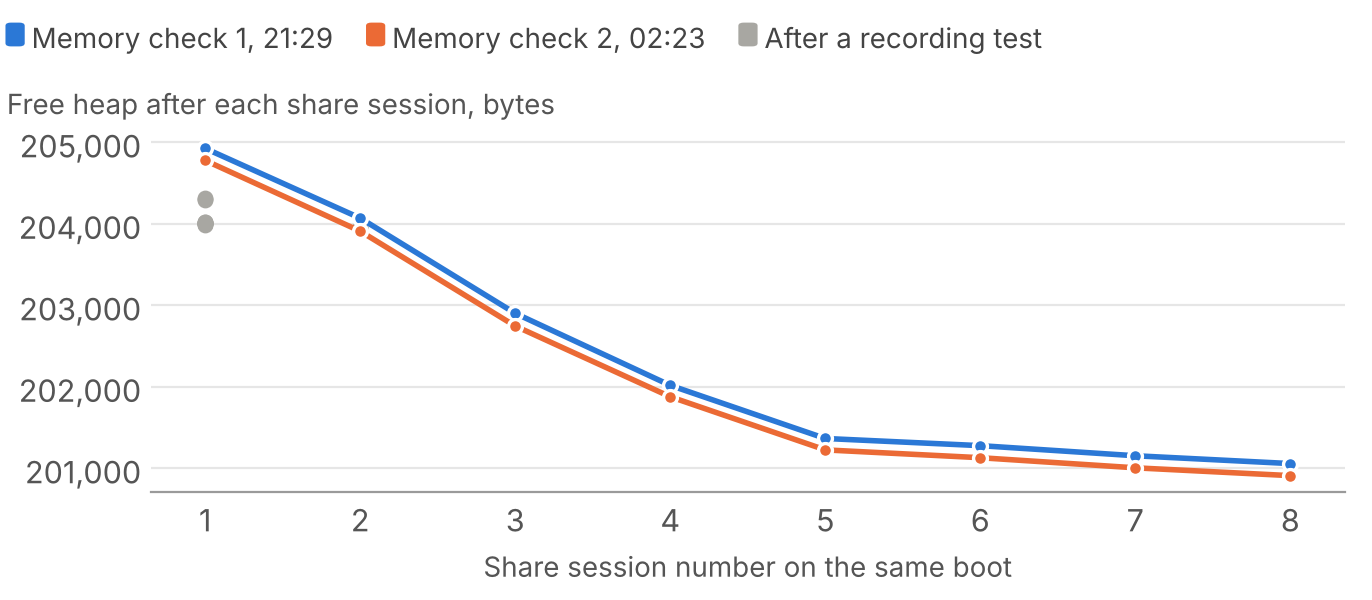
Table view
| Session on the boot | Memory check 1, bytes | Memory check 2, bytes |
|---|---|---|
| 1 | 204,928 | 204,780 |
| 2 | 204,072 | 203,912 |
| 3 | 202,904 | 202,748 |
| 4 | 202,020 | 201,880 |
| 5 | 201,368 | 201,228 |
| 6 | 201,280 | 201,132 |
| 7 | 201,156 | 201,008 |
| 8 | 201,060 | 200,912 |
After a recording test, a single share session ended with 203,952–204,316 bytes free.
The first five sessions on a boot lose about 3,500 bytes between them; after that it is about 100 bytes per session. The end-of-night check repeats the start-of-night one to within about 160 bytes, so nothing accumulated across the night. Every photo wakes the board from deep sleep with a fresh heap, which is why the share sessions after recording all end near 204,000 bytes free.
My reading is that the Wi-Fi stack fills its internal pools over the first few start/stop cycles and then levels off. The leftover 100 bytes per session would take about 2,000 share sessions on one boot to matter, and the real camera restarts when the switch changes mode.
Sharing
Download speed
Each dot is one 2.1 MB photo downloaded over the home network, in order over the night, coloured by job.
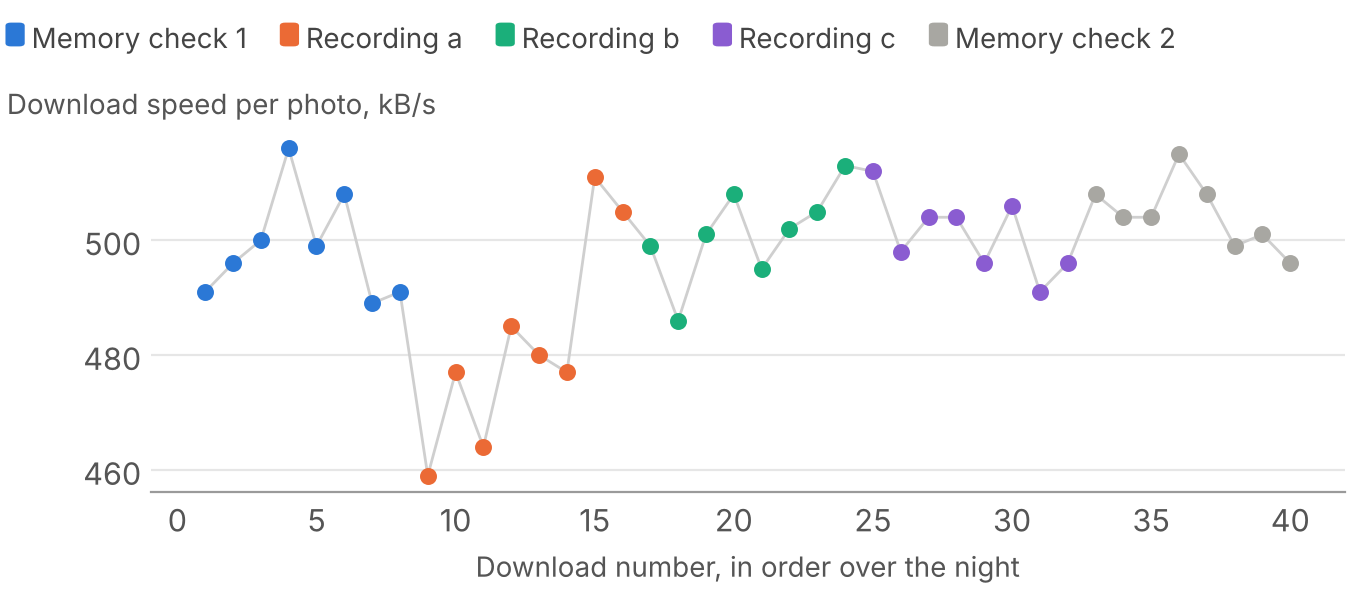
Table view
| Job | Downloads | Speed, kB/s (min / median / max) | Seconds per photo (min / median / max) |
|---|---|---|---|
| Memory check 1 | 8 | 489 / 498 / 516 | 4.08 / 4.23 / 4.30 |
| Recording a | 8 | 459 / 479 / 511 | 4.06 / 4.27 / 4.46 |
| Recording b | 8 | 486 / 502 / 513 | 4.05 / 4.10 / 4.28 |
| Recording c | 8 | 491 / 501 / 512 | 4.04 / 4.14 / 4.23 |
| Memory check 2 | 8 | 496 / 504 / 515 | 4.03 / 4.12 / 4.18 |
The camera reads the card at 16 MHz into one buffer while sending the other, so card reads and Wi-Fi sending overlap. The slower patch in recording a is most likely the home network (an inference).
Wi-Fi start-up
Seconds from the !share command to the camera having an address on the home network.
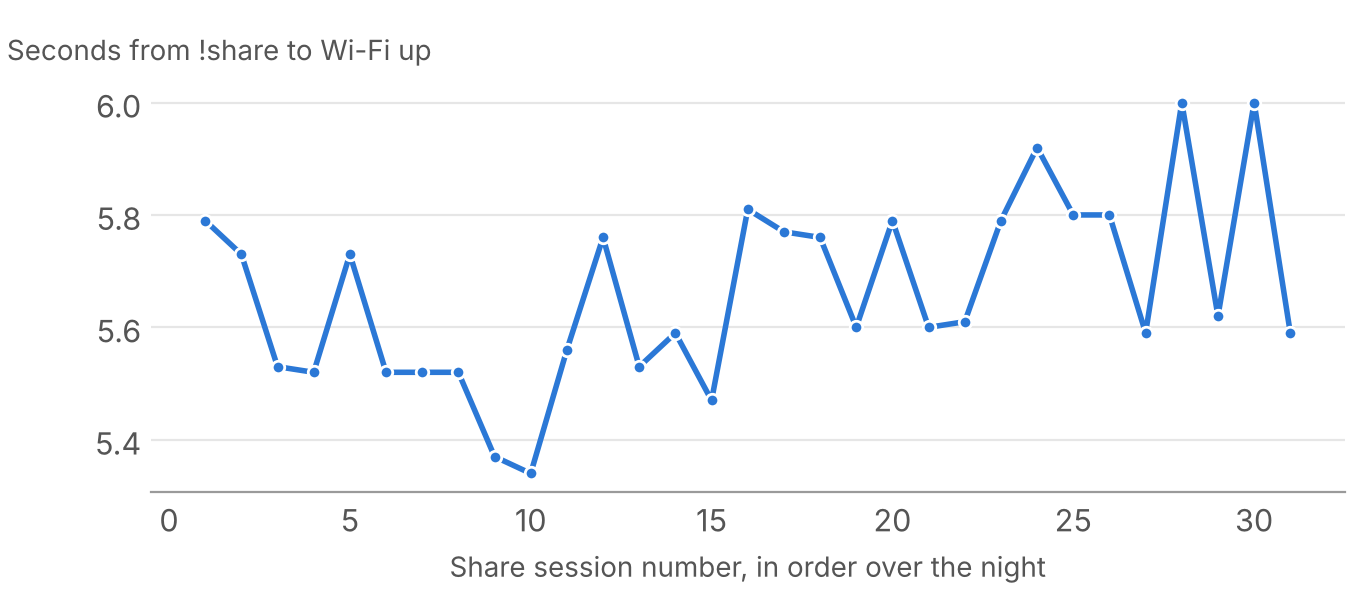
Table view
| Job | Sessions | Wi-Fi up, s (min / median / max) |
|---|---|---|
| Memory check 1 | 8 | 5.52 / 5.53 / 5.79 |
| Recording a | 5 | 5.34 / 5.53 / 5.76 |
| Recording b | 5 | 5.47 / 5.76 / 5.81 |
| Recording c | 5 | 5.60 / 5.61 / 5.79 |
| Memory check 2 | 8 | 5.59 / 5.80 / 6.00 |
A share session with two photo downloads took 15.2–15.95 s from !share to the server shutting down.
Recording
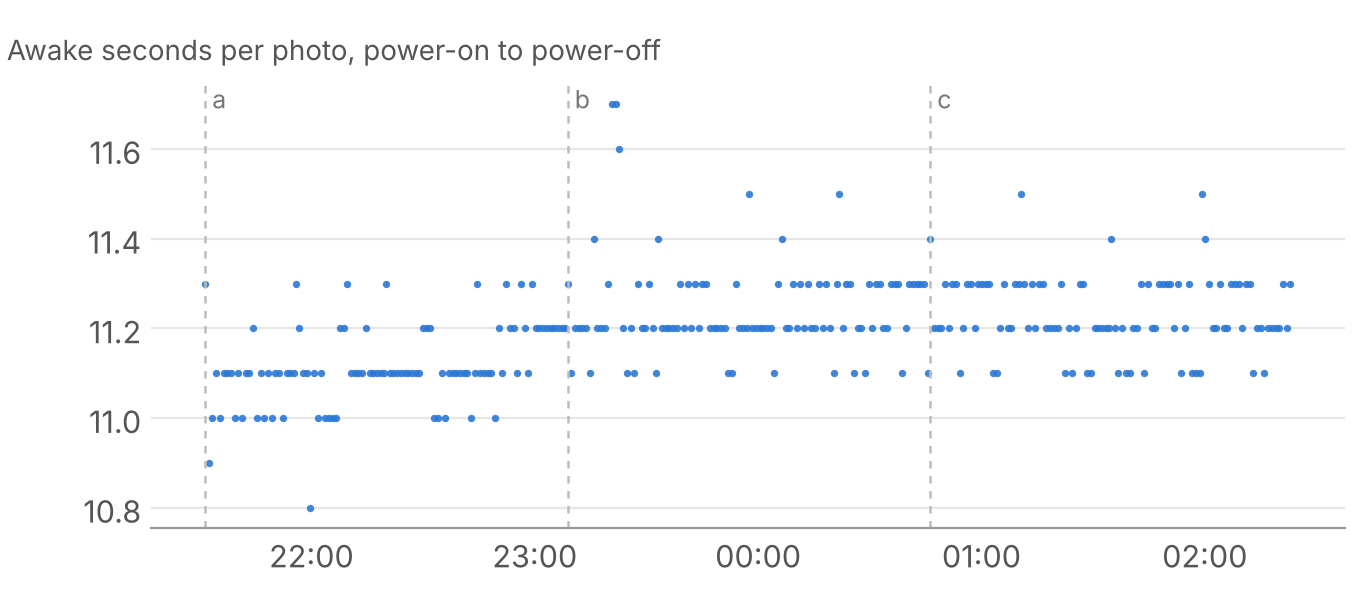
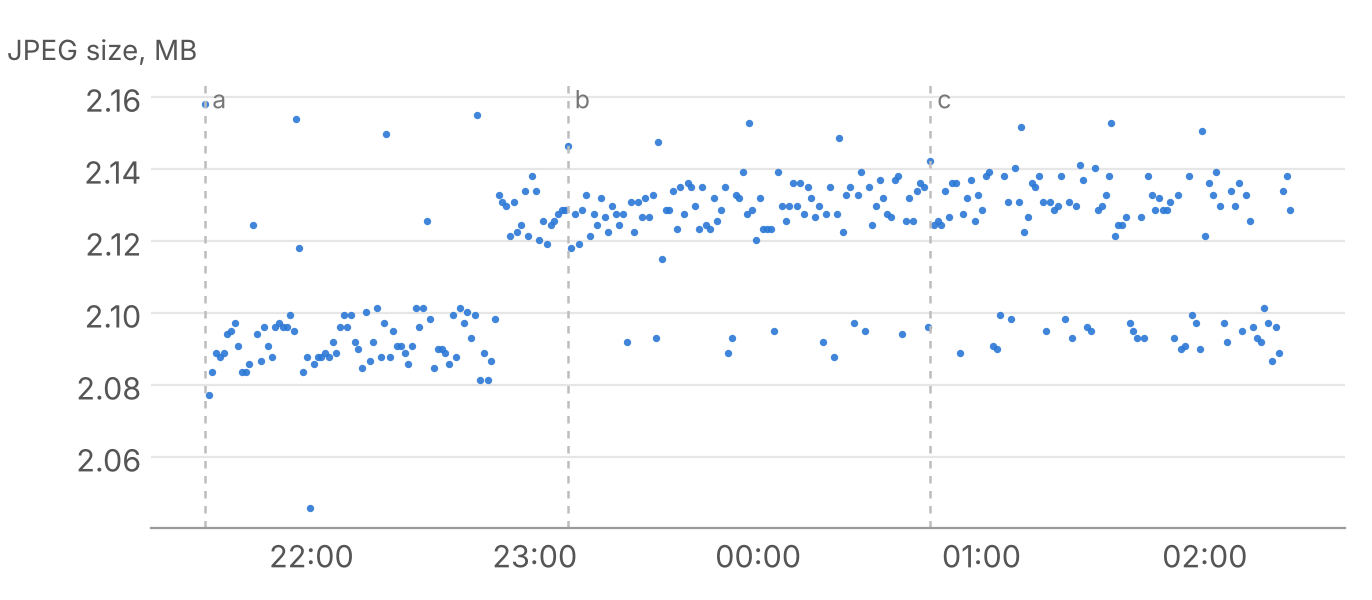
The dashed lines mark the start of recording jobs a, b and c. Each dot is one photo.
Awake time per photo
From power-on to power-off, autofocus on.
JPEG size
Camera ready after power-on
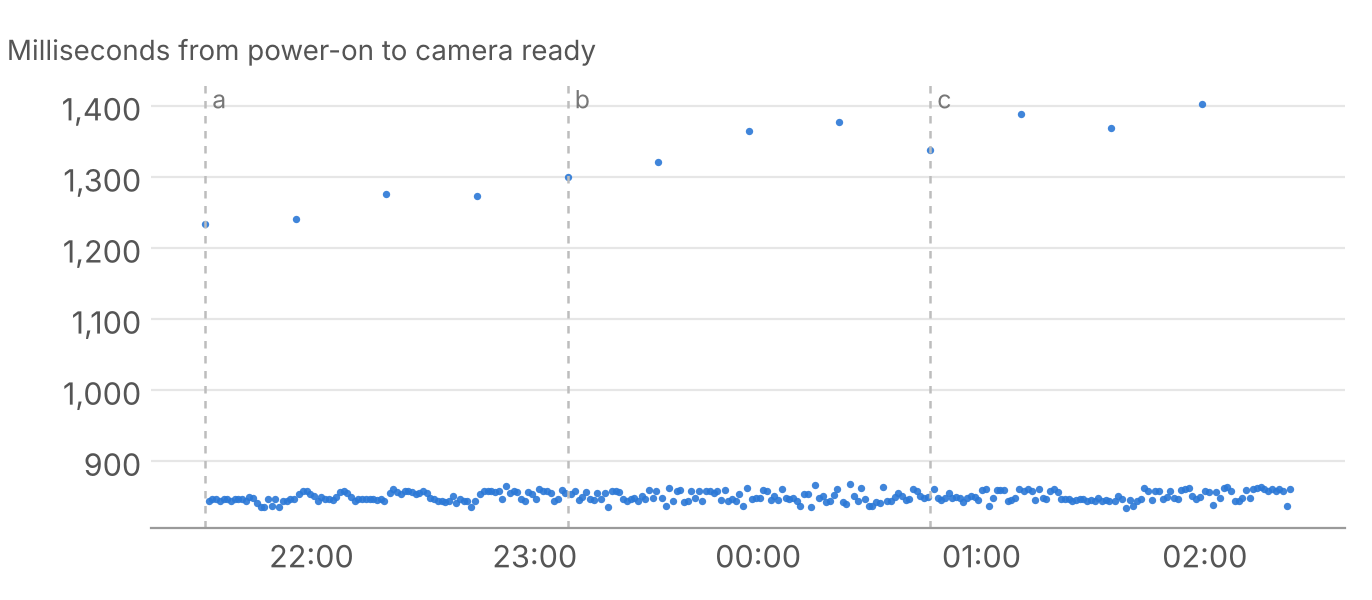
The high dots are the first photo of each test, when the camera starts cold. Every other photo is ready in about 0.85 s.
SD card write time
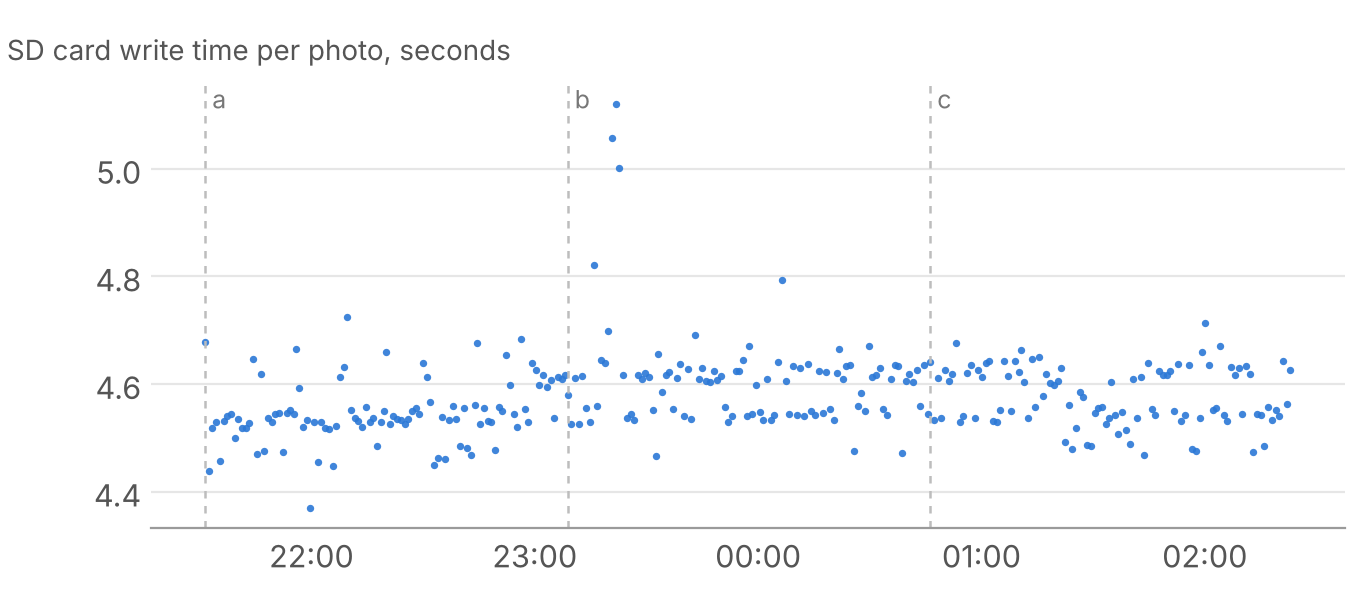
Written at 8 MHz on the shared bus; it follows the JPEG size.
Battery reading
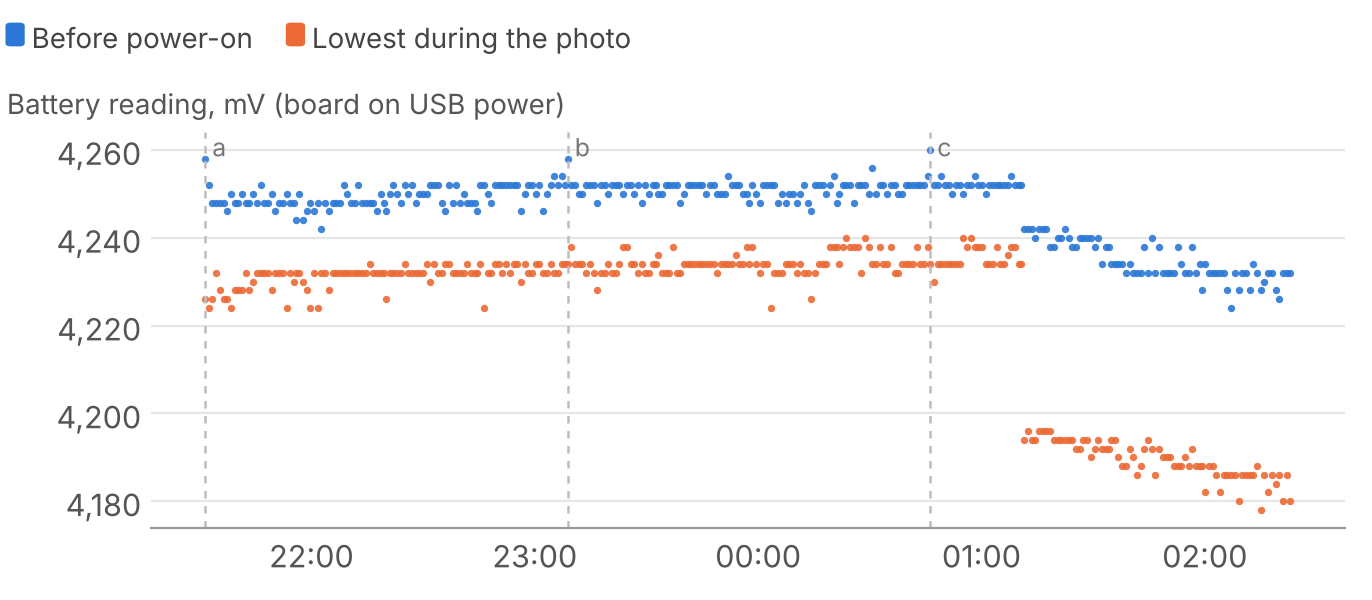
Table view
| Measure | Recording a (min / median / max) | Recording b | Recording c |
|---|---|---|---|
| Awake, s | 10.8 / 11.1 / 11.3 | 11.1 / 11.2 / 11.7 | 11.1 / 11.2 / 11.5 |
| JPEG size, MB | 2.046 / 2.096 / 2.158 | 2.088 / 2.129 / 2.153 | 2.087 / 2.129 / 2.153 |
| Camera ready, first photo of a test, ms | 1234, 1240, 1276, 1273 | 1300, 1321, 1364, 1377 | 1338, 1388, 1369, 1402 |
| Camera ready, other photos, ms | 835 / 847 / 864 | 835 / 848 / 867 | 834 / 848 / 863 |
| SD card ready, ms | 582 / 595 / 612 | 583 / 596 / 615 | 582 / 596 / 611 |
| SD write, s | 4.37 / 4.54 / 4.73 | 4.47 / 4.61 / 5.12 | 4.47 / 4.56 / 4.71 |
| Camera read, s | 2.17 / 2.22 / 2.29 | 2.21 / 2.26 / 2.28 | 2.21 / 2.26 / 2.28 |
| Battery before power-on, mV | 4242 / 4248 / 4258 | 4246 / 4252 / 4258 | 4224 / 4238 / 4260 |
| Battery lowest during photo, mV | 4224 / 4232 / 4234 | 4224 / 4234 / 4240 | 4178 / 4192 / 4240 |
Things worth a second look
None of these caused a failed photo, but they are changes over the night that I can’t fully explain yet.
JPEG size stepped up at 22:50. Photos grew by about 0.04 MB from the 7th photo of the fourth test in job a, and awake time and SD write time rose with them by about 0.1 s. From then on, about one photo in five falls back to the lower size. A sharp photo makes a bigger JPEG, so I compared crops from the two sizes. They look equally sharp; the sheet sits a few pixels differently between frames.
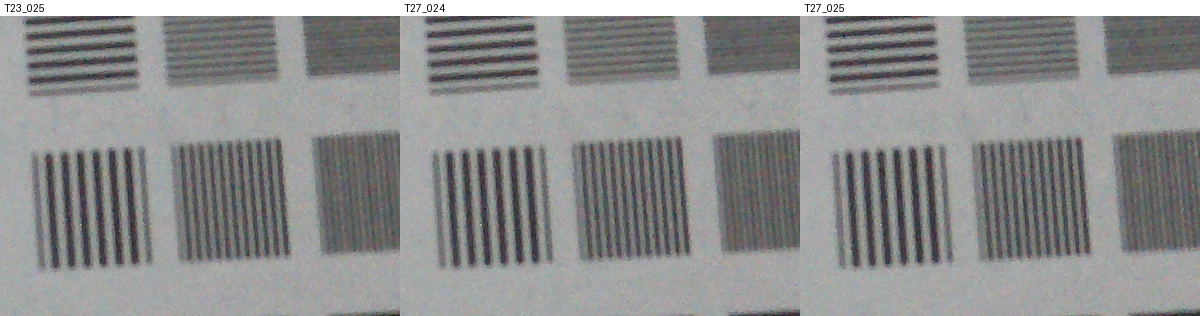
T23_025 (before the step, 2.099 MB), T27_024 (lower band, 2.088 MB) and T27_025 (upper band, 2.127 MB), 100 % crops.
A change in the room light or the paper settling are the likely causes (inference). On this scene the size difference is not a sharpness difference.
The battery reading dropped at 01:11. Before power-on it fell about 10 mV, and its lowest point during a photo fell about 40 mV, between the first and second photo of a test (just after a share session), and it drifted slowly down after that. The board was on USB, so my guess is that the charger finished topping up the battery and the battery then supplied part of each photo’s current. This needs checking with a meter.
The cold first photo got slower. The camera took 1.23 s to be ready on the first photo of the first test and 1.40 s by the last, while every other photo stayed at about 0.85 s.
Numbers come from the serial logs of the five runner jobs and the photos the runner downloaded.